 Grip
GripProfessional recordings and screenshots within seconds.
Press your keys and talk. Grip zooms where you click, glides your cursor, and captions your voice. The link works before the upload finishes.
macOS 15 or later on Apple silicon No account No watermark
Show, don’t tell. In their own words.
People come to Grip from recorders that felt slow and editors that ate the afternoon. This is what they say a week later.
I switched from my old recorder and never looked back. Recording used to feel like paperwork. Now it’s one keystroke.
AleksProduct Engineer, PostHog It’s so snappy. I press the shortcut, talk, stop, and the link works before the upload is even done.
MikeGTM Engineer People reply to my videos asking how I made them. Honestly, Grip did.
BartoszProduct Engineer, Netflix If your engineers are shy about sharing updates, try giving them Grip.
AnnaEngineering Manager, ex-Box
Record once. Skip the editing.
Raw recordings are hard to watch: a tiny cursor on a huge screen, nothing in focus, and a lot of “um”. Grip polishes the take for you, and keeps every edit a choice you can change.
-
Press your shortcut
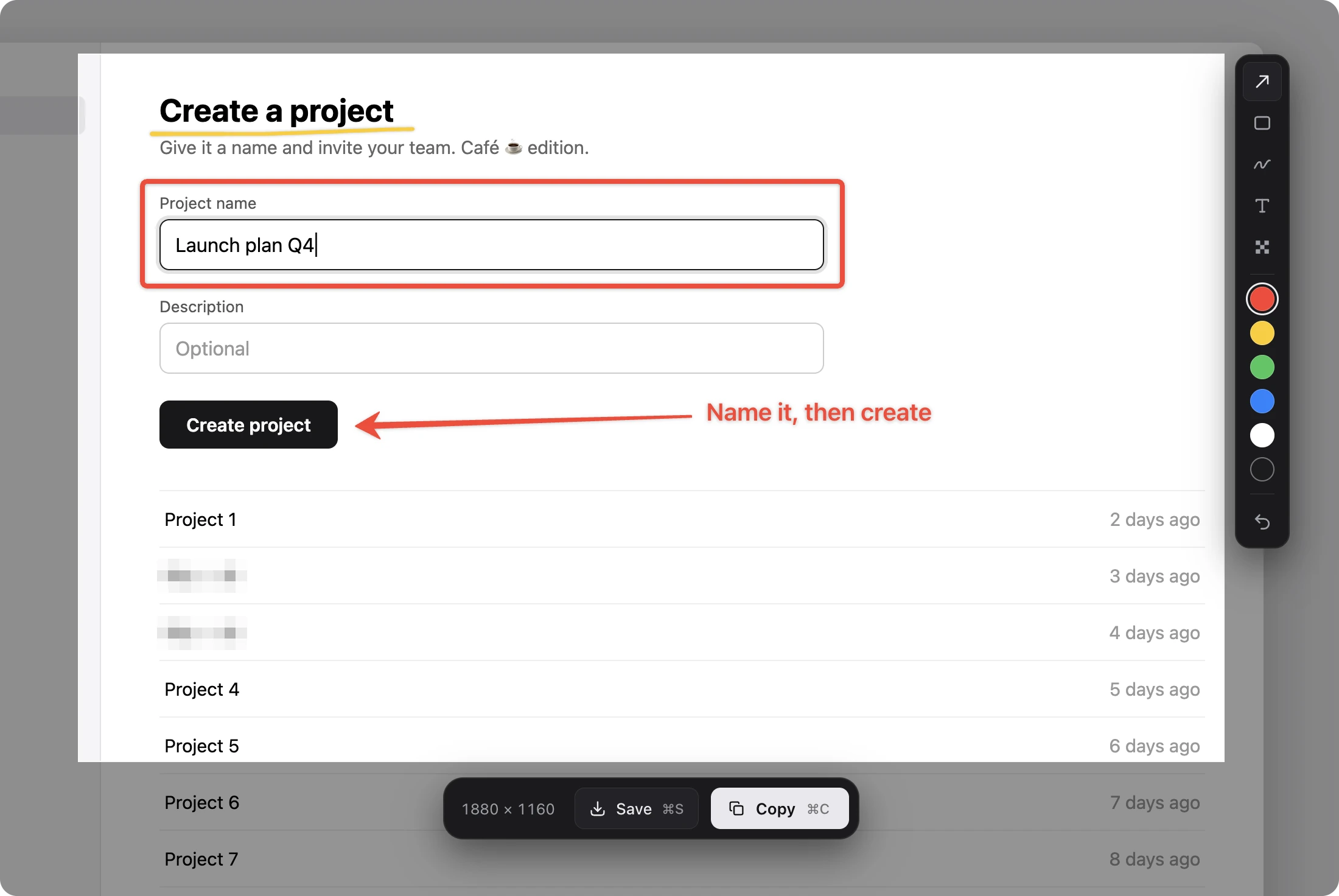
The screen freezes under Grip’s overlay with your last area selected. Mark it up and copy it, or press Return to record.
-
Talk it through
Camera, mic, and system audio record on one clock. Grip stays out of the shot and warns you when your mic goes silent.
-
Stop and share
A small card offers an MP4 under 20 MB, a GIF under 10 MB, or a link that works before the upload finishes.
One keystroke. Screenshot or video.
Press your keys, even macOS’s screenshot ones, and the screen freezes in the mode you used last. Draw arrows, boxes, ink, and text on top, pixelate what’s private, then copy it, save it, or record it.
How capture works- Five markup tools, one key each
- Area, display, window, or iPhone
8ms From shortcut to ready
Blink and you’ll miss it.
Press your shortcut and the screen freezes, ready to record. Grip naps in your menu bar, so there is never anything to wait for.
- 12×
Faster than a blink
Even the quickest blink takes about 100 milliseconds. Grip is ready twelve times over.
- 100×
In one heartbeat
At rest, your heart beats about once every 0.8 seconds. Grip could open a hundred times in between.
- 2×
Faster than a hummingbird
Its wings flap about 50 times a second. Grip is ready before one flap is done.
It zooms where you click.
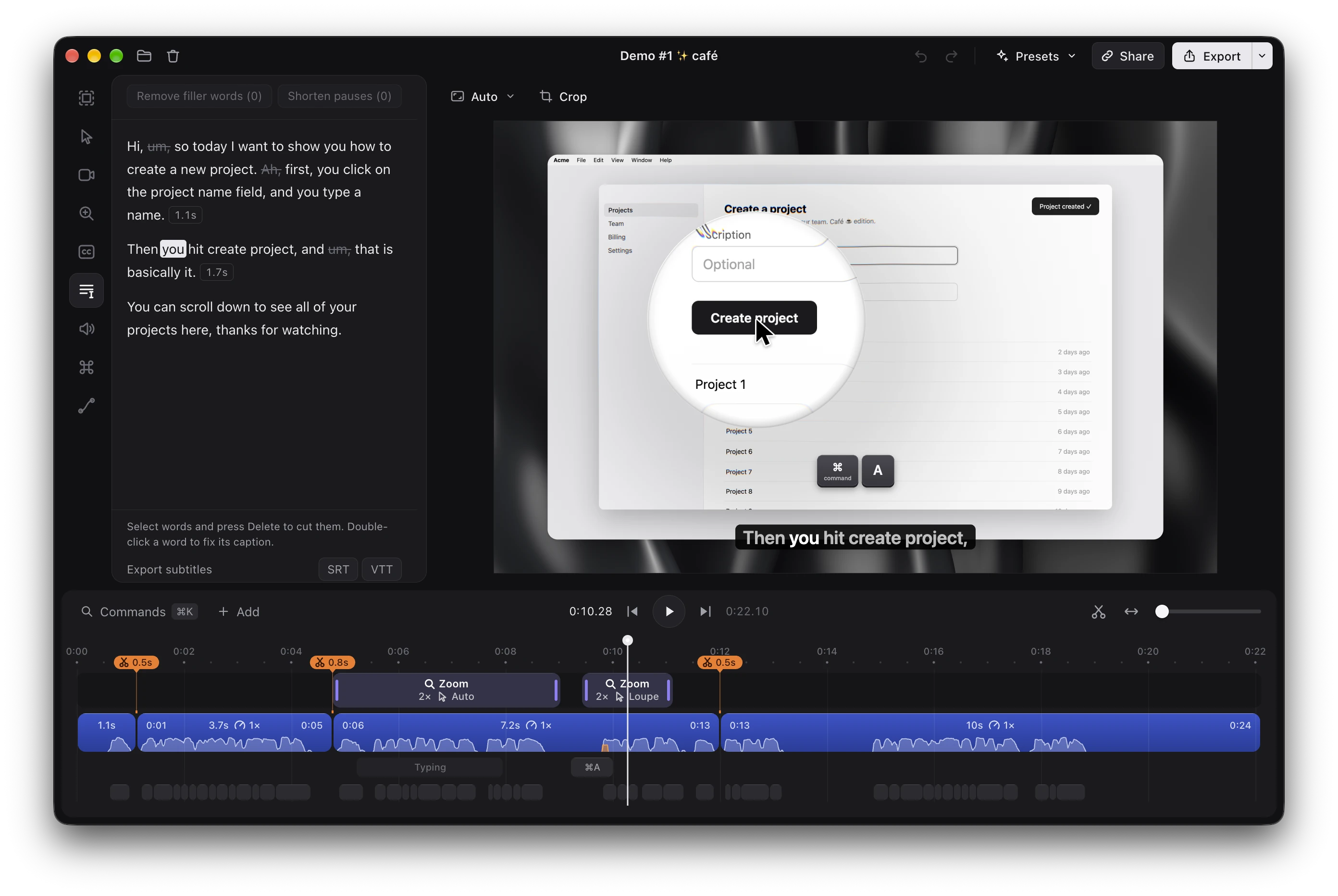
Clicks and typing become zooms that follow your cursor, and a glass loupe magnifies one spot while the rest stays in view. The cursor is redrawn smooth, passing exactly through every click.
What Grip polishes- Each zoom is an edit you can move
- Keystrokes as keycaps in your layout
Captions written on your Mac.
Grip transcribes your voice on your Mac and times every word. It cuts background noise, softens harsh S sounds, keeps quiet phrases audible, and makes sure nothing clips, so you sound produced.
How your voice sounds- 25 European languages
- As loud as online video
Edit a video like a doc.
Select words in the transcript and press Delete, and the video follows. Grip finds filler words and long pauses and removes them in one click. The rest is a keyboard-first timeline.
Everything the editor does- C cuts, X ripple-deletes, Z zooms
- Speed from 0.25× to 8×, pitch kept
Frame it after the take.
Pick a wallpaper, a device frame, and a camera style once the recording is done. Save the whole look as a preset, and every new take can wear it.
Every look Grip has- 185 wallpapers, drawn live on the GPU
- MacBook, iPhone, and iPad frames
One take, every format. Nothing falls out of frame.
MP4 up to 4K, a GIF that fits a README, or subtitles aligned through every cut. Narrow formats follow the cursor, and share links take comments at the exact second.
The usual recorder bugs. Designed out.
Each one shipped in a real screen recorder. Grip designs them out from the first commit instead of patching them later.
-
Subtitles drift or ignore your cuts
Captions, zooms, keystrokes, and audio stay in sync through every cut and speed change.
-
Zooms shift when you trim the clip before them
Every zoom, caption, and keystroke stays on its moment, however you cut around it.
-
The cursor is baked into the video
Grip records the screen without the cursor and draws it back in, so you can smooth, resize, or hide it later.
-
The export doesn’t match the preview
One renderer draws both, so the export matches the preview frame for frame.
-
A crash or power loss eats the take
Grip writes the take to disk as it records and rebuilds an interrupted one at the next launch.
-
A full disk corrupts the recording
Grip won’t start with under 1 GB free, warns when space runs low, and keeps what it wrote.
-
A # or emoji in a project name breaks a feature
Names like “Demo #1 ✨ café” are in the test suite and the demo project.
-
Long projects make the editor crawl
The timeline is checked against a 2-hour project with 500 cuts, 300 zooms, and 20,000 caption words.
Free and open source. Your recordings stay yours.
-
Open source
Every line is on GitHub under AGPL-3.0, so anyone can read it, build it, or keep it going.
-
Runs on your Mac
Recording, editing, transcription, and background removal stay on it. No telemetry, and crash reports stay on your disk.
-
No account to record
Only sharing a link signs in to bestboy.dev, once. Viewers, teammates, and comments never cost anything.
Questions
Another question? Ask on GitHub
Is Grip free?
Yes. Grip is free and open source under AGPL-3.0, with no subscription, no account, and no watermark.
What do I need?
macOS 15 or later on Apple silicon. Captions download a speech model of about 670 MB the first time you use them.
Where do my recordings go?
Nowhere, unless you share them. Grip goes online only to download the speech model once, to check for updates, and to upload what you share.
Can I change an edit later?
Always. Grip keeps your screen, camera, mic, and every click and keystroke on separate tracks. Every zoom, cut, and caption is an edit you can undo, and the raw recording never changes.
What if my Mac crashes mid-recording?
You keep the take. Grip writes tracks in fragments and rebuilds an interrupted recording at the next launch.
Which languages do captions support?
25 European languages, transcribed on your Mac by NVIDIA Parakeet v3, with timing for every word.
Can I script it?
Yes. grip:// links start and stop a recording and open projects, so Raycast, Shortcuts, or a shell script can drive Grip.
How do updates work?
Grip updates itself. Updates download in the background and install while you’re away, never during a recording or an export.
Record the demo you keep putting off.
Download Grip, press your shortcut, and have a link to share before the moment passes.
Free and open source AGPL-3.0