
You had one job. Now you have plenty.
Many Claude Code agents, one window, one merged pull request each. Every task gets its own git worktree and its own agent, and Malini takes it from prompt to merged.
macOS 13 or later on Apple silicon · No account · No subscription
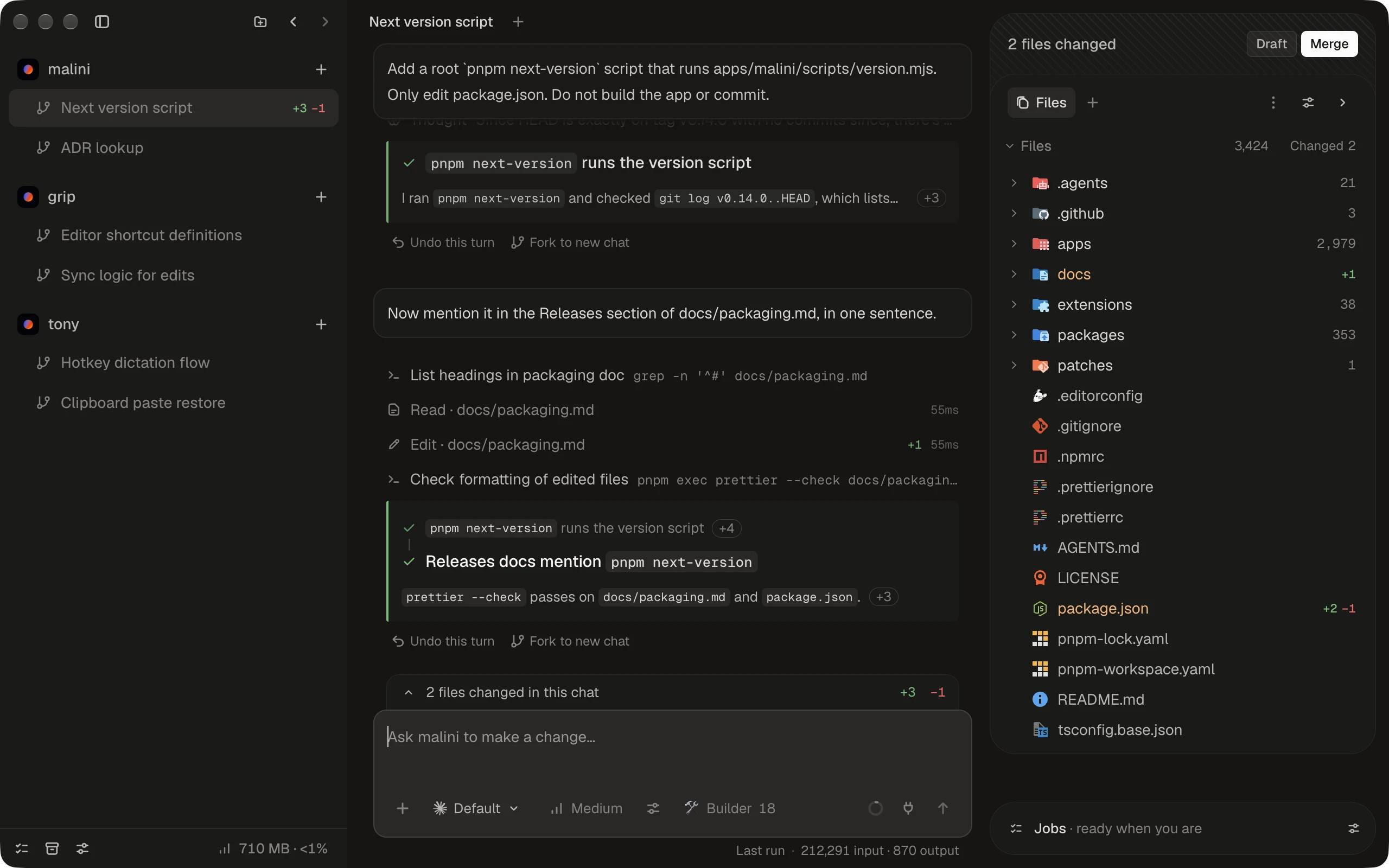
One task. One worktree. One merged pull request.
Malini gives every task its own agent and its own branch, so ten things can move at once without stepping on each other.
- 1
Start a task
Each task is a workstream: its own git worktree, its own branch, its own chats. Start one or start a hundred.
- 2
Keep it moving
Queue prompts, run jobs, plan first if you like. Agents write code, and Malini owns git.
- 3
Press Draft, then Merge
Malini commits, opens the pull request, fixes red checks, addresses reviews, and merges once GitHub allows.
A chat that keeps up
Enter queues a prompt after the current run, Cmd+Enter steers it now, and background commands keep running. Edit, reorder, or delete what is waiting.
About the chat- Plan mode, model and effort per prompt
- Undo any run, or fork it to a new chat
- Send RateLimit headers on every API response.
The bucket already knows the limit, the remaining budget and when the window resets. I will send them as
RateLimit-Limit,RateLimit-RemainingandRateLimit-Resetfrom the middleware, so every response carries them.
A browser the agent can drive
Browser tabs sit next to your files. The agent opens, types, clicks, and screenshots, and the tabs it opens show up beside yours.
The agent's tools- Pick an element and it lands in your prompt
- The same tabs for you and the agent





From prompt to merged. Without babysitting a branch.
Agents write the code. Malini owns git: it commits, opens the pull request, and keeps it moving until GitHub merges it.
A merge queue that does the chores
Press Merge and Malini pushes, marks the pull request ready, updates from main, and waits for checks and review. While it waits, it runs Fix checks, Update from main, and Address review.
How workstreams ship- Says Needs you only when it must
- Merges exactly the commit that passed
Jobs · ready when you are
Outcomes, not skills. Ask for them by name.
A job is agent work you reuse: instructions, a model, an effort, and only the skills it needs. Routines run jobs when something happens.
Routines that earn your trust
Ask the agent for a routine and it writes the trigger from Malini's own events. Every save waits for your approval, and a new routine starts as a draft.
How routines work- Draft, then candidate, then unattended
- Triggers on any event Malini emits
- Whenever one of my pull requests merges, run Update docs.0m, 0.0s
Jobs
Open source, so we can’t rug pull you. Transparent, all the way down.
-
Open source
The code is public under AGPL-3.0. We can’t take it back, and if we ever go wrong, you can fork it.
-
No account, no server
Your code leaves your Mac only through your own Claude Code and the GitHub CLI.
-
Two calls of its own
Update checks, and anonymous usage data you can turn off. Every big decision is written down.
Docs for people and agents
Every docs page is plain markdown at its URL plus .md. llms.txt lists them all, and every event Malini emits is documented with its payload.
Read the docs- llms.txt and llms-full.txt, built from the docs
- The events reference is generated from the code
~ curl -s bestboy.dev/malini/llms.txt | grep -o 'https[^)]*\.md'
https://bestboy.dev/malini/docs.md
https://bestboy.dev/malini/docs/install.md
https://bestboy.dev/malini/docs/updates.md
https://bestboy.dev/malini/docs/workstreams.md
https://bestboy.dev/malini/docs/chat.md
https://bestboy.dev/malini/docs/jobs.md
https://bestboy.dev/malini/docs/routines.md
https://bestboy.dev/malini/docs/agent-tools.md
https://bestboy.dev/malini/docs/extensions.md
https://bestboy.dev/malini/docs/reference/events.md
~ curl -s bestboy.dev/malini/docs/routines.md | head -n 6
---
title: Routines
description: A Malini routine runs jobs, extension commands, and workflows in order when a trigger fires - when you run it, when a workstream is created, when a frontend resource becomes ready, or on any Malini event.
---
A routine is a list of steps that run in order when its trigger fires.
~
Frequently asked questions
Have a different question? Ask on GitHub
Is Malini free?
Yes. Malini is free and open source under AGPL-3.0, with no account and no subscription. The agents run on your own Claude Code, so their usage counts against your own Claude plan.
What do I need?
macOS 13 or later on Apple silicon, and git. Malini ships the GitHub CLI, and setup installs Claude Code if you don’t have it.
Does my code go through a Malini server?
No. There is no Malini account and no Malini server. Your code goes to Anthropic through your own Claude Code, and to GitHub through the GitHub CLI. Malini makes two calls of its own: update checks to GitHub Releases, and anonymous usage data that you can turn off under Settings, Privacy.
Can an agent commit or push on its own?
No. The agent bridge refuses commit, push, rebase, reset, and gh pr create. Malini owns the history: it commits, pushes, and opens the pull request when you press Draft or Merge.
Won’t parallel agents clobber each other?
Every workstream is its own git worktree on its own branch, branched from a private clone of the repository, with dependencies installed from the lockfile.
Which models can I use?
Fable, Opus, Sonnet, or Haiku, from Low to Max effort, picked per prompt. The composer shows your context window and your plan usage.
Can I extend it?
Yes. The inspector, its panels, commands, settings, and workflows come from extensions. The extension API is MIT licensed, so an extension can use any license.
How do updates work?
Updates download in the background and install when you quit, or right away with Restart to Update.
Give every task its own agent.
Download Malini, connect Claude Code and GitHub, and add a repository.
Free and open source · AGPL-3.0
 Your first workstream
- Step 1 Download Malini Drag it to Applications and open it.
- Step 2 Connect Claude Code and GitHub Install and Sign in for Claude Code, and a one-time code in your browser for GitHub.
- Step 3 Add a repository Clone one or open a folder. Your first workstream is ready.